7 Mistakes With CTR Manipulation Tools for Home IP Addresses
You bought a CTR tool, pointed it at your home IP, and assumed the risk was handled. It is not: every visit you send carries a location, a device type and a click path that can be checked.
By the end, you will know the seven mistakes that quietly break home IP campaigns and how to avoid each one. You will understand how CTRTool handles visits, locations and screenshot proof, how credits and daily resets work, and whether this setup fits the rankings you are actually chasing.
What Is CTRTool? Campaign Types, Proof Model and Who It Serves
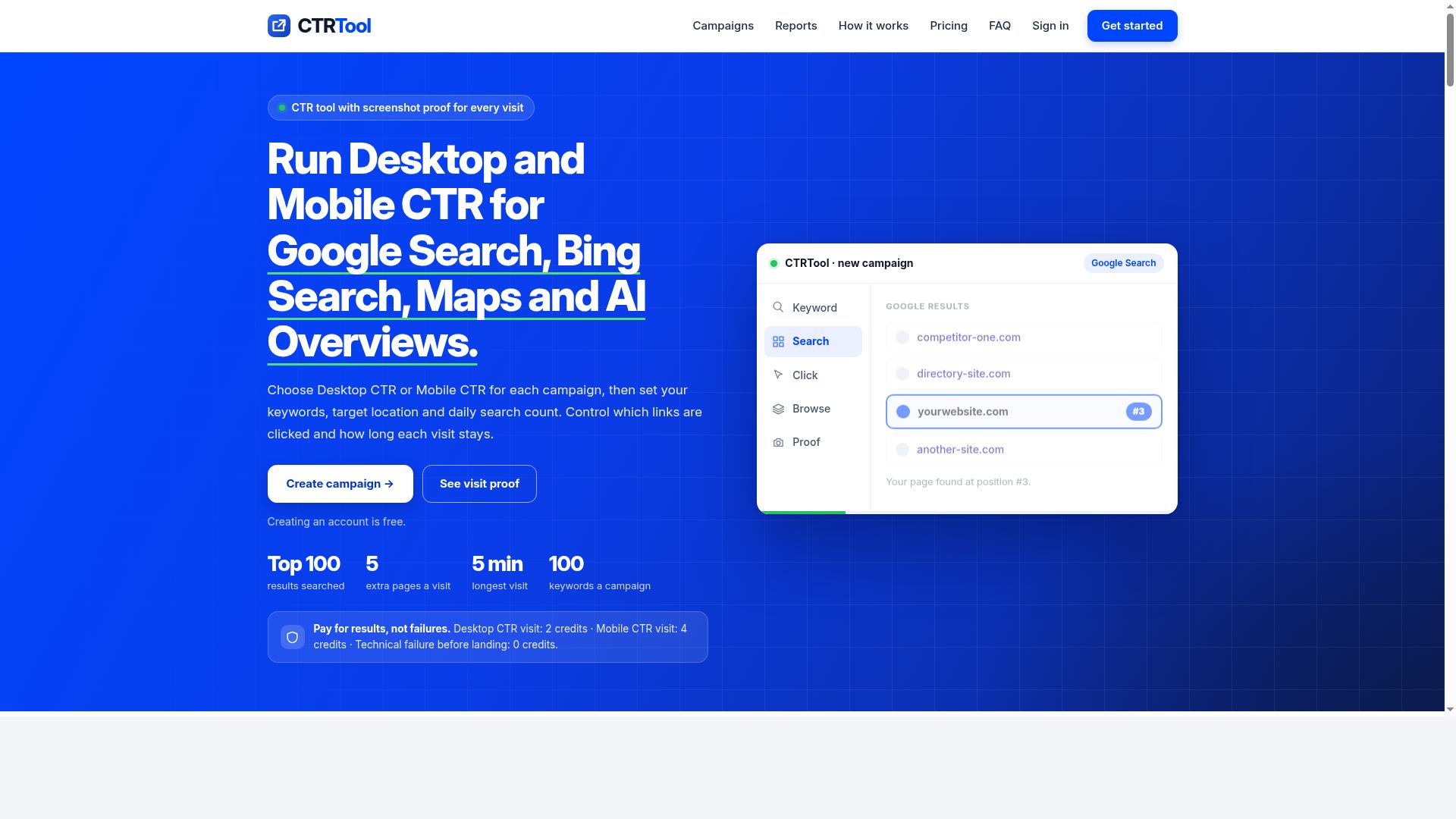
CTRTool is a CTR campaign platform that runs Desktop and Mobile click campaigns for Google Search, Bing Search, Maps, and AI Overviews, with screenshot proof for every visit. It is built for SEO practitioners and agencies running campaigns for their own sites or for client properties.
Each campaign lets the user choose Desktop CTR or Mobile CTR, then set the keywords, target location, and daily search count. Users also control which links are clicked and how long each visit stays, so session duration and dwell time are part of the plan rather than an afterthought.
What separates it from generic CTR manipulation tools is the proof model. Every visit is backed by a screenshot, and full visit paths are recorded, so an agency can show a client exactly what happened during a campaign instead of asking for trust.
The platform is honest about limits. Its own site states that automated visits do not guarantee rankings. That framing matters for anyone weighing CTR manipulation tools against home IP addresses, because it sets realistic expectations about what click activity can and cannot do for SERP ranking.
In short, CTRTool serves teams that want structured, documented click campaigns across four surfaces, with position tracking and visual evidence, rather than anonymous clicks with no audit trail.
Do Home IP Addresses Make CTR Manipulation Tools Risky? CTRTool's Answer
Using home IP addresses for CTR manipulation might seem safer than datacenter IPs, but it introduces risks like IP rotation limits, footprint creation, and detection by search engines. Residential connections are tied to real households, so heavy clicking from one line creates a recognisable pattern over time.
Proxy pool quality varies widely, and recycled addresses can land on a blacklist without warning. CTRTool approaches the problem differently, focusing on verifiable visit behaviour rather than raw IP volume. The details follow below.
How CTRTool Handles Visits, Locations and Proof
CTRTool manages visits by providing screenshot proof for each one, allowing location targeting down to country, state, and city, and tracking keyword positions over time. Search and landing screenshots arrive as separate proof images, so you can see both the query and the page that received the click.
Each campaign also records a full visit path. That record shows how a visit moved through the site rather than presenting an isolated click. Visits can last up to 5 minutes and include up to 5 additional internal pages, which supports healthier session duration and dwell time signals.
Geo-targeting is flexible. You can aim at a specific country, state, or city, or use an "Any country" mix to spread activity naturally. One requirement applies: the page must appear in the top 100 organic results for the chosen keyword and location before a campaign can run.
This structure directly addresses the home IP risk described above. Instead of leaning on a fragile proxy pool, CTRTool ties every visit to verifiable proof and a tracked path. If a visit cannot verify the requested location, no credits are charged, and technical failures before landing are not billed either. Keyword positions are tracked over time, including Maps listing order and AI citation order, giving you a clear view of movement rather than guesswork.
Mistake 1: Assuming a Home IP Alone Keeps CTR Campaigns Safe
Assuming a home IP address alone ensures safety is a critical mistake because search engines analyze IP rotation patterns, browser fingerprints, cookie persistence, and other signals that can reveal automated behavior. A residential IP changes where clicks appear to originate, but it does nothing to disguise how those clicks behave once they land.
Consider IP rotation frequency. If a single home connection produces clicks across dozens of unrelated keywords within minutes, the pattern looks nothing like genuine browsing. Search engines also map subnet and ASN relationships, so a cluster of residential IP addresses from the same provider can still form a recognizable footprint.
Browser fingerprinting adds another layer. Screen resolution, installed fonts, timezone, language settings, and user agent spoofing inconsistencies can flag a session long before click fraud detection even looks at the IP. Cookie persistence matters too: a browser that never accumulates history, or that clears cookies between every visit, stands out against real users who carry sessions forward.
Session behavior completes the picture. Short session duration, instant bounces, and zero dwell time on landing pages contradict the natural engagement that genuine organic traffic produces. Research suggests search engines weigh these engagement signals heavily when assessing click-through rate quality.
What should you consider instead? Look for CTR manipulation tools that manage IP rotation, fingerprint variation, cookie handling, and session timing together rather than treating the IP as the only variable. Diversity across subnets, realistic query diversity, and human-like pacing matter far more than a single residential address.
Mistake 2: Skipping Screenshot Proof and Full Visit Paths
Skipping screenshot proof and full visit paths leaves you unable to verify campaign execution and increases the risk of click fraud or bot detection. A campaign that looks successful in a summary report may be built on visits that never loaded the page, never scrolled, or never engaged with your content.
Without a captured record of the SERP at the moment of the click, you cannot confirm that your target keyword appeared, that the correct listing was clicked, or that the click happened on the intended device and location. Proof turns assumptions into evidence.
Full visit paths matter just as much. When you can trace the route from query to click to on-page behavior, you gain the ability to review session duration, bounce rate, and dwell time and judge whether the traffic behaves like a real visitor would.
- Screenshots confirm the keyword, ranking position, and listing at click time.
- Visit paths show how the session moved through pages after landing.
- Behavior signals reveal whether engagement looked natural or mechanical.
When proof is missing, spend is wasted on visits you cannot audit, and unnatural patterns may trigger bot detection or search engine penalties. Choose tools that provide verifiable screenshots and complete session records so every campaign can be checked and corrected.
Mistake 3: Ignoring Keyword Position Limits Before Launching
Ignoring keyword position limits before launching a CTR campaign can result in failed visits because your page must appear within the top 100 organic results for the chosen keyword and location. Each campaign type carries its own position requirement, and skipping that check wastes both time and credits.
CTRTool is transparent about these thresholds, so there is no excuse for launching blind. Verifying your standing first is the difference between a campaign that runs and one that quietly fails.
Top 100 Results, Maps Listings and AI Overview Source Links
CTRTool enforces specific position limits: top 100 organic results for search campaigns, up to 50 listings for Maps, and a matching source link for AI Overview campaigns. These limits exist because a click only counts as a realistic visit when the target can actually be found at that position.
For Google Search and Bing Search campaigns, the page must rank within the top 100 organic results for the chosen keyword and location. If your page sits outside that range, the campaign cannot deliver a valid visit and the credits spent on it are wasted.
Maps campaigns work differently. The business listing must appear within the first 50 listings, which is roughly five pages of map results. A listing buried deeper than that falls outside the check and the campaign will not proceed as intended.
AI Overview campaigns add a third condition: the page needs a matching source link. Without that citation, the campaign has nothing to anchor to and cannot run correctly.
Checking these limits before launch is straightforward:
- Search your target keyword in the chosen location and confirm the page appears within the top 100 organic results.
- Open Maps for the same area and count whether the listing falls within the first 50 entries.
- Confirm the page is cited as a source for the relevant AI Overview before selecting that campaign type.
The consequence of skipping this step is simple: failed visits and lost credits. CTRTool does not guarantee higher rankings, leads or sales, so the position check is the user's responsibility, not something the platform can fix after the fact. A few minutes of verification protects your balance and keeps each campaign pointed at a target that can actually be reached.
Mistake 4: Mismatching Desktop vs Mobile and Daily Search Counts
Mismatching desktop and mobile campaign settings or exceeding daily search count limits can lead to throttled visits and inefficient use of credits. This mistake is easy to overlook because the settings look harmless on the surface. Yet the pattern a campaign produces is what search engines and bot detection systems actually evaluate.
Campaign tools generally let you choose a Desktop CTR or Mobile CTR profile for each campaign. That choice should reflect the real audience of the target keyword. Running a mobile-heavy profile against a query that is overwhelmingly searched on desktop creates a visible browser fingerprint mismatch, especially when the same residential IP addresses are reused across sessions.
Daily search counts and click velocity matter just as much. Setting a daily count far above what a keyword realistically receives looks unnatural, and search engines may respond with throttling limits that quietly suppress visits. Credits get spent while results stall.
Common mismatches to avoid:
- Running mobile campaigns for a desktop-heavy audience, such as B2B or technical queries.
- Setting daily search counts too high for low-volume keywords or narrow geo-targeting.
- Spiking click velocity on a new campaign instead of building it gradually.
Keep daily counts proportional to the keyword's realistic impression share, and match the device profile to the query type. A gradual ramp with consistent limits protects session quality and avoids wasted spend.
Mistake 5: Targeting the Wrong Location or Country Mix
Targeting the wrong location or using an inappropriate country mix can result in visits from irrelevant regions, skewing CTR data and wasting credits. Geo-targeting is not a minor setting. It decides whether your campaign reflects real demand or just noise.
A well-built CTR manipulation tool supports country, state, and city targeting, plus an "Any country" option for a mixed geographic spread. Choosing the right level matters. A local service business needs city or state precision, while a broad national campaign can justify a wider mix.
Mismatched targeting damages campaign validity in two ways. First, clicks from unrelated regions rarely convert into meaningful organic traffic signals, so your click-through rate data no longer matches the audience you actually serve. Second, a lopsided country mix can leave a footprint that stands out in logs.
- Targeting globally when the business only serves one city or region.
- Leaving "Any country" active for a campaign that needs a single market.
- Concentrating visits on one ASN or subnet instead of spreading across a residential IP pool.
- Ignoring CGNAT and dynamic IP behavior, which can cluster many users behind one address range.
Before launch, confirm the target geography matches the keyword intent, then review the resulting IP mix for repeated ASN or subnet patterns. That single check prevents wasted credits and keeps the campaign grounded in the right market.
Mistake 6: Misreading Credits, Daily Resets and Failed Visits
Misunderstanding how credits are consumed, when daily resets occur, and why visits fail can lead to unexpected credit depletion and campaign underperformance. Credits are spent per visit, and daily resets can shift how a campaign paces itself over time.
Failed visits caused by position limits may still consume credits, which is why careful credit tracking matters. Without that oversight, a campaign can burn through its balance before it delivers the steady click-through rate signals you intended.
Pricing Plans and What Each Credit Buys
CTRTool offers monthly plans in USD: Starter at $59/month for 2,000 credits (up to 1,000 Desktop CTR visits or 500 Mobile CTR visits) and Growth at $125/month for 5,000 credits (up to 2,500 Desktop or 1,250 Mobile visits). Growth is marked Recommended, and both plans sit under limited launch pricing, with prices rising 30% on November 15.
Credit consumption is not uniform. A Desktop CTR visit costs 2 credits, while a Mobile CTR visit costs 4 credits, so device mix directly shapes how far a balance stretches. A verified search without a match costs 1 credit, and a technical failure before landing costs 0 credits.
| Plan | Price | Credits | Desktop Visits | Mobile Visits |
|---|---|---|---|---|
| Starter | $59/month | 2,000 | Up to 1,000 | Up to 500 |
| Growth | $125/month | 5,000 | Up to 2,500 | Up to 1,250 |
| Scale | $399/month | 20,000 | Up to 10,000 | Up to 5,000 |
| Agency | $699/month | 40,000 | Up to 20,000 | Up to 10,000 |
Failed visits due to position limits may still consume credits, so a campaign that repeatedly misses its target position can quietly drain a balance. Account for that when estimating campaign volume rather than assuming every credit becomes a completed visit.
Unused credits roll over while a subscription is active and expire when cancellation takes effect, and creating an account is free. Match the plan to realistic volume: a light desktop-focused campaign fits Starter, while heavier mobile or multi-keyword work leans toward Growth or above.
Mistake 7: Running Campaigns Without Tracking Positions Over Time
Running CTR campaigns without tracking keyword positions over time means you cannot measure impact, detect penalties, or adjust strategy effectively. A campaign that lifts click-through rate for a week looks successful until you notice the target page slipped from position 4 to position 12.
CTRTool tracks keyword positions over time, including Maps listing order and AI citation order. That longitudinal view lets you see whether a campaign is moving rankings, holding them steady, or quietly eroding them.
Without this tracking, three risks compound:
- Missed ranking drops that surface weeks after the damage is done
- Search engine penalties that go unnoticed until organic traffic collapses
- Ineffective campaigns that keep consuming budget with no measurable lift
A practical routine is to record baseline positions before launch, monitor during the campaign, and compare again after it ends. Pair those readings with Google Search Console data on impressions and average position to separate real movement from noise.
Watch the trend line rather than any single day. If positions slide while click velocity rises, that gap is your earliest signal to pause, review the residential IP setup, and adjust before a manual action lands.
Who Should Use CTRTool - and Final Verdict
CTRTool is best suited for SEO practitioners and agencies running CTR campaigns for their own or client websites across Google Search, Bing Search, Google Maps, and AI Overviews. If you need documented evidence that a campaign actually ran, this is the audience the tool was built for.
The platform fits teams that treat click-through rate work as a measurable project, not a one-off experiment. Agencies managing multiple client properties benefit most, since campaign proof and position tracking are central to how they report results.
Freelancers and in-house SEOs also fit, provided they understand the risks covered earlier in this article. Mistakes with home IP addresses, proxy pools, and browser fingerprints do not disappear because a tool is involved. CTRTool supports the campaign; the operator still owns the setup decisions.
Who should look elsewhere? Anyone expecting instant rankings without oversight, or teams unwilling to budget credits carefully. Position limits and credit costs mean campaigns need planning, not guesswork.
Strengths:
- Screenshot proof of campaign activity
- Full visit paths, not just isolated clicks
- Geo-targeting across the supported search surfaces
Limitations:
- Credit-based costs that scale with campaign size
- Position limits that cap how far a campaign can push
Final verdict: CTRTool is a credible, purpose-built option for SEO professionals who want proof-backed CTR campaigns and position tracking. Weigh the credit costs and position limits against your campaign scope before committing. For support questions, contact vaibhav@autoblogging.ai.
Frequently Asked Questions
Does using a home IP address make CTR campaigns safer than a data-center IP?
A home IP can look more natural than an obvious data-center IP, but it is not a substitute for a well-built campaign. You still need realistic keyword targeting, sensible visit pacing and genuine-looking behavior. CTRTool is built around pay-for-results credit visits with screenshot proof, so you can verify each visit rather than assuming an IP alone protects you.
Why do my campaigns fail when I target keywords my page doesn't rank for?
CTRTool's campaigns require the page to appear within the top 100 organic results for the chosen keyword and location. If your page isn't in that range, the visit can't be completed as intended. Check your ranking first, then target keywords where you actually appear, and use position tracking in CTRTool to watch movement over time.
How many credits does a Desktop versus Mobile visit use?
On CTRTool's Starter plan at $59/month you get 2,000 credits, which covers up to 1,000 Desktop CTR visits or 500 Mobile CTR visits. Growth at $125/month provides 5,000 credits for up to 2,500 Desktop or 1,250 Mobile visits. Choose Desktop CTR or Mobile CTR per campaign so your credit use matches your goal.
Can I run campaigns for Google Maps and AI Overviews, not just Search?
Yes. CTRTool runs campaigns for Google Search, Bing Search, Maps and AI Overviews, with screenshot proof for every visit. Maps campaigns check up to 50 listings (about five pages), and AI Overview campaigns need a matching source link. This lets you cover multiple surfaces instead of limiting yourself to classic organic search.
How do I know the visits actually happened?
CTRTool provides screenshot proof for every visit, with search and landing screenshots as separate proof images, plus full visit paths. That means you can review what happened rather than trusting a dashboard count alone. It's a practical way to catch setup mistakes early and confirm campaigns are running as intended.
Can I target a specific country or city with a home IP setup?
CTRTool lets you target a chosen country and optionally a state and city, or select "Any country" to use a mix of supported locations. Matching your target location to your actual audience is important, especially for Maps and local keywords. If you need help configuring location settings, contact support at vaibhav@autoblogging.ai.